
Planet Finder +5.1 - Google Play
You'll be able to see results in few seconds.
Publisher Description


is an astronomy application that you can use to show exactly what you see when you look up at the sky. You just need to open the application and point it to the sky.
It allows you to spot the planets as well as stars, constellations, and galaxies.
You can choose different viewpoints:
Planetarium
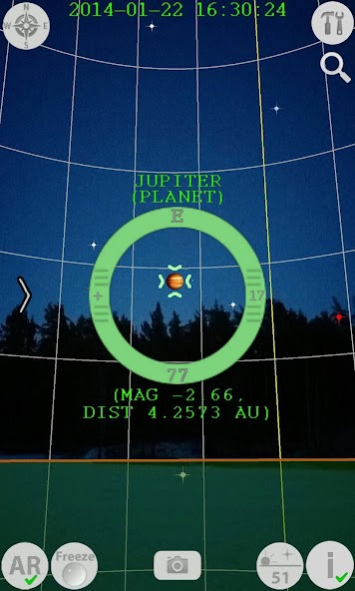
- this is the most user-friendly view where you just point your device to the sky in order to see the planets, stars, constellations, and galaxies.
Astronomy Compass
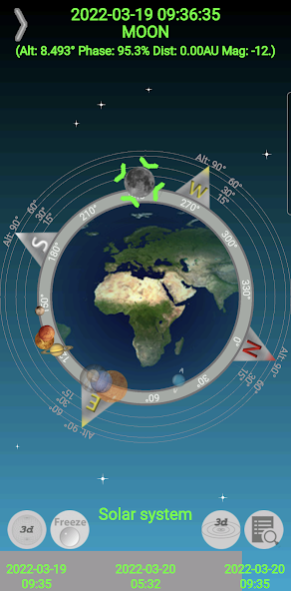
- this is the most efficient view to discover where the planets, brightest stars or galaxies are located around you.
Solar system simulator
- this is the view to get a feel for our solar system, its dimensions and your orientation within it.
In all the different views you can use a player interface to check past and future positions of the celestials.
You can explore:
Most of the planets and their moons in a 3D simulator.
(For Jupiter and Saturn you can check the real time postion of their moons.
For the Sun you get information about it's current number of sunspots.)
The rise, set and transit times of celestials.
The structure of the Milkyway (the Milkyway arms, the center, the inner bulge, and bar)
You can configure:
MySky
- a set of 10 celestials that are displayed in the Planetarium view and the Astronomy Compass view. This allows you to find and display all known celestial bodies that mankind has discovered.
You can enable:
Your camera in the planetarium view. (Augmented reality feature)
You can share:
A screenshot from the planetarium view.
It's extremely easy! Just launch the application to obtain an instant overview of the planets surrounding you. You're in a geocentric position in the middle of the screen, on Earth, and the planets are being displayed around you. If a planet is above the Compass Ring and is highlighted, it's visible. If the planet is below the Compass Ring, towards the center of the Earth, it is shadowed and below your horizon. The same applies to all the other celestial types. Activate your starcraft engines and quickly travel around in the universe.
Planet Finder + comes with an advanced Augmented Reality Camera: Just point your phone to the sky and Planet Finder + will instantly switch to Augmented Reality Mode. Spot planets, stars, and constellations through your mobile camera, take a snapshot and share via Facebook, email, twitter or MMS!
Interact with the Augmented Reality View by activating its Player. Play, pause, rewind and fast forward the Solar System. This will render the trajectories of the planets and the moons of Jupiter and Saturn.
You can also track planets, stars, constellations, and galaxies. Just follow the direction of the arrows and you'll spot your object in seconds!
Switch back to 2D Compass or Text View by lowering your mobile phone. Get more detailed information by touching a celestial item in the text list. (for instance its rise/transit/set times)
Hit the Solar system simulator 3d icon to switch to a 3d heliocentric view of the solar system. Switch between real and boosted sizes and get amazed by it's gigantic proportions. Switch between inner, outer and full solar system views and navigate to a planet by using the search function.
Single tap the 3D Planet for a detailed 3D view of its texture and its moons.
About Planet Finder +
The company that develops Planet Finder + is JtApps. The latest version released by its developer is 5.1.
To install Planet Finder + on your Android device, just click the green Continue To App button above to start the installation process. The app is listed on our website since 2022-10-31 and was downloaded 0 times. We have already checked if the download link is safe, however for your own protection we recommend that you scan the downloaded app with your antivirus. Your antivirus may detect the Planet Finder + as malware as malware if the download link to mobile.PlanetFinderPlus.com is broken.
How to install Planet Finder + on your Android device:
- Click on the Continue To App button on our website. This will redirect you to Google Play.
- Once the Planet Finder + is shown in the Google Play listing of your Android device, you can start its download and installation. Tap on the Install button located below the search bar and to the right of the app icon.
- A pop-up window with the permissions required by Planet Finder + will be shown. Click on Accept to continue the process.
- Planet Finder + will be downloaded onto your device, displaying a progress. Once the download completes, the installation will start and you'll get a notification after the installation is finished.
Program Details
System requirements
Download information
Pricing
Version History
version 5.1
posted on 2022-10-31
Moon orbit added to solar system simulator.
Spaceship added above observer location.
Tuning of touch navigation close to planets.
Div fixes for solar system simulator.
Bug fix for DST.
version 5.0
posted on 2022-04-05
Solar system simulator added
Augmented reality player can now be fully customized
Target android framework upgraded to 12.0 (Snow Cone)
version 4.7
posted on 2021-01-06
Increased range of astrophysical calculations (from 1900 to 2100)
Time limit of player speed for improved user experience
Time limit of fps compass rendering to save processing power
Lower package storage footprint
Target android framework upgraded to 11.0 (Red Velvet Cake)
version 4.6
posted on 2019-02-10
Version 4.6:
MySky finally added to augmented reality view!
Improved search in augmented reality view.
Target android framework upgraded to 9.0 (Pie).
Bug fix location handling.
Bug fix sunspot number on Pie devices.
Version 4.54:
In honor to Space X successfull launch of falcon heavy rocket, you can now use it to navigate between compass views.
version 4.54
posted on 2018-02-11
Version 4.54:
In honor to Space X successfull launch of falcon heavy rocket, you can now use it to navigate between compass views.
version 4.4
posted on 2016-06-12
version 4.4,New search and track feature added to augmented reality view. It's a lot easier now to search and find your favorite celestials!,Improved sensor readings with google fusion algorythm that you can choose to use.,version 4.3,customize the compass with mysky celestial configuration,new textures for dwarf planet pluto and its moon charon,version 4.22,celestials positions corrected for earth precession,minor bug fix
version 3.2
posted on 2013-05-13
Several fixes and updates
Disclaimer
Official Google Play Link
We do not host Planet Finder + on our servers. We did not scan it for viruses, adware, spyware or other type of malware. This app is hosted by Google and passed their terms and conditions to be listed there. We recommend caution when installing it.
The Google Play link for Planet Finder + is provided to you by apps112.com without any warranties, representations or guarantees of any kind, so access it at your own risk.
If you have questions regarding this particular app contact the publisher directly. For questions about the functionalities of apps112.com contact us.
